
The INPI form: where people get stuck registering a micro-enterprise, and how to get past it
In France, you register a micro-enterprise through a single online form: the guichet unique, the one-stop registration portal run by INPI (the French intellectual property office). On paper, it takes half an hour. In practice, many people get stuck in the same places: a field nobody understands, an error message that does not say what to do, a file sent back for corrections. Here are the spots where people stop most often, and how to get past each one. For a step-by-step walkthrough of the whole form, see our main INPI guide.
This article is general guidance. The guichet unique interface changes; field names are given as they were in 2026. This is not legal advice.

1. You cannot log in: INPI Connect and FranceConnect+
The problemYou search for “INPI login” and end up in the wrong place, or logging in through FranceConnect+ fails.
What to doThe form is on procedures.inpi.fr, under the button “Créer, modifier ou cesser une entreprise” (create, change or close a business). There are two ways to log in. INPI Connect is an ordinary account with an email and password, open to everyone, and it is all you need to register a micro-enterprise. FranceConnect+ requires a digital identity: for example, Identité Numérique La Poste can only be set up with a French ID card or a residence permit issued less than five years ago. If FranceConnect+ does not work for you, create an INPI Connect account. Note that INPI Connect can be linked to FranceConnect+ only once, and the link is permanent. The email confirming your address sometimes lands in spam.
2. The error “nous n’avons pas réussi à identifier correctement votre commune”
The problemThe form will not move on and asks you to pick your commune (municipality) from a list and update it on your account page — the message means “we could not correctly identify your commune”. It does not tell you what is actually wrong.
What to doAccording to INPI itself, the problem is the address on your account, not the form. Open “Mon compte” (my account) at the top right of procedures.inpi.fr and correct the address: write the commune name as it appears in the land registry (cadastre), with the same capitals and hyphens, and use the commune’s ordinary postcode, without CEDEX. If a list of suggestions appears as you type, pick from it. Save and go back to your draft: it is saved at every step. If that does not help, call INPI Direct on 01 56 65 89 98, on weekdays from 9 am to 6 pm.
3. The social security number: you cannot go further without it
The problemThe “numéro de sécurité sociale” (social security number) field in the section about you is mandatory, and people who have recently arrived often do not have one yet.
What to doThe number is issued by the CPAM, your local health insurance office. For people arriving from abroad, this takes time: you need a translated birth certificate, you often get a temporary number first, and the permanent one comes one to three months later. Allow for this before you register. There is no official word on whether the form accepts a temporary number, so check with INPI Direct. If you have already worked in France as an employee, you have a number: it is on your Vitale card and your payslips. For residence status and the right to work for yourself, see our guide for foreign entrepreneurs.
4. Questions about you that people get wrong
- “L’entreprise bénéficie-t-elle du statut micro-entrepreneur ?” (does the business have micro-entrepreneur status?) — answer “Oui” (yes), or the form will take you down a different regime.
- Previous self-employed activity — if you had one, answer “Oui” and give your former SIREN number. If it was a micro-enterprise, bear in mind that to qualify for ACRE (the start-up contribution relief) when restarting the same activity, the new start must fall on or after 1 January of the second year after closing, and a new ACRE is only possible three years after the previous one ended.
- Marital status. If you are married or in a PACS (civil partnership), the form will ask what role your spouse or partner plays in the business. If they do not work with you, simply say so.
- Business address. When asked whether to use your home address as the business address: if you work from home, answer “Oui”; if you work from separate premises, answer “Non” (no), and give that address later, in the “Établissements” (business premises) section. If your address comes from a domiciliation company, it must hold a prefecture licence (agrément). Who can use their home address: see our domiciliation guide.
5. The start date of your activity
The problemIt looks like a formality, but money and deadlines depend on it.
What to doA date in the past means contributions will be charged from that date. If you have not started trading yet, put today’s date, or a date in the near future if the form accepts it. The 60 days for applying for ACRE run from this date, and the deadline for your first turnover declaration (no earlier than 90 days later) will be in the notice you get from Urssaf. More on ACRE in our news piece on ACRE in 2026.
6. Activity description and category
The problemPeople write a long, polished description and pick the first category that looks close. Then the file is sent back for corrections, or ends up with the wrong body.
What to doIn the “Description détaillée” (detailed description) field, say briefly what you do: “Création de sites internet”, “Cours de langue anglaise”, “Photographe”. Choose the categories (catégorisation) based on what the work actually is: they decide who reviews your file and your contribution rate. Services and liberal professions are usually reviewed by Urssaf, crafts by the chamber of trades (chambre de métiers), retail by the commercial court registry (greffe). If the activity is regulated (some crafts, construction), you will need proof of qualification.
7. The “Origine du fonds ou de l’activité” field
The problemThe “Origine du fonds ou de l’activité” (origin of the business or activity) field is confusing: what is a “fonds”, and what does it have to do with you if you have not bought anything?
What to doA fonds is a business as an asset: its customer base, its name, its equipment. The field asks whether you are starting from scratch or taking over someone else’s business. If you are starting for the first time and are not buying or renting anything from anyone, choose “Création” (creation) under “Type d’origine” (type of origin). The other options are for buying or leasing an existing business, and they require documents about the transaction.
8. Documents: what gets rejected
The problemThe file comes back because of a document, even though “everything was uploaded”.
What to doID: valid, both sides (French ID card, passport or residence permit). Handwrite on the copy that it is a true copy of the original (“certifiée conforme à l’original”) and sign it. A legible scan, file no larger than 10 MB. Your name on the form must match the uploaded document letter for letter: if the spelling differs between your passport and your residence permit, pick one document and follow it. Proof of address: no more than three months old and showing the same address as on the form; a mobile phone bill is usually not accepted. Declaration of no criminal record (déclaration sur l’honneur de non-condamnation): signed. Upload and check everything before you sign: after signing, you can no longer replace a document. Full list in our main guide.
9. Your file status: what it means and what to do
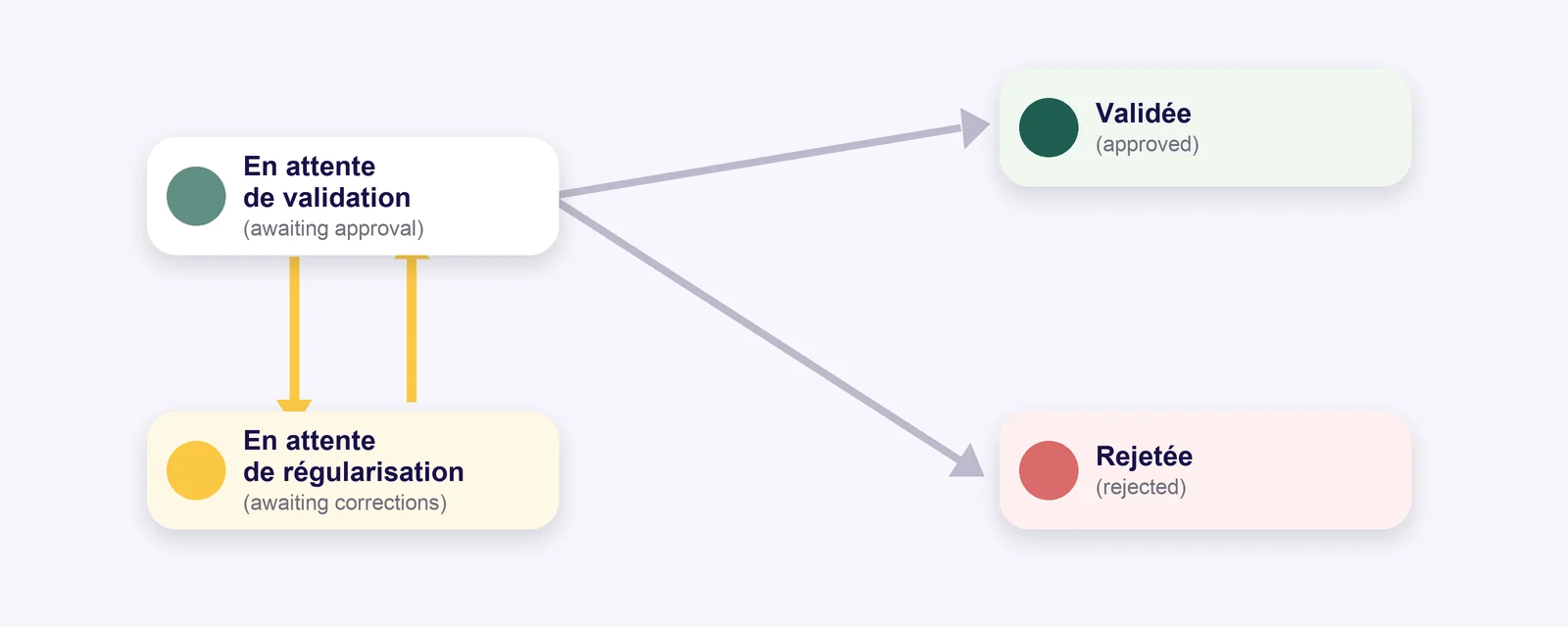
- “En attente de validation” (awaiting approval) — the file is being reviewed; you do not need to do anything.
- “En attente de régularisation” (awaiting corrections) — this is not a refusal. Open the file: it says what to correct and which body is asking. Make the corrections and resubmit from the same account, within the deadline the body has set — otherwise it may reject the file. Questions about the substance go to that body (Urssaf for most micro-entrepreneurs), not to INPI.
- “Validée” (approved) — the file has been accepted; your SIRET number will arrive separately.
- “Rejetée” (rejected) — the file has been refused and cannot be corrected. To go ahead, you submit a new application.
- “En attente de signature” / “de paiement” (awaiting signature / payment) — the file is still with you: you need to sign it (and pay, if there is a fee).
Notifications arrive by email — check your spam folder too.
10. Before signing: Sirene and marketing
The problemOnce all your details have been checked, the form asks about making your information public, and it is easy to click past.
What to doThe first asks whether your business should appear in the public Sirene business directory. The second asks whether you allow your details to be used for marketing. If you do not want calls and letters from “services for new entrepreneurs”, answer “Non” to the second. Then comes the signature, after which nothing can be corrected, so read the summary (“Récapitulatif”) calmly: your draft is saved.
If you are already a micro-entrepreneur
Adding a second activity (for example, selling things you make on top of teaching) is not a new registration but a change to the existing one: in the same guichet unique, via “Modifier” (change). The catch is that you cannot sign a change with INPI Connect. You need to log in through FranceConnect+ or have a qualified electronic signature. If you have neither, a representative (mandataire) can file it for you under a power of attorney.
Correct as of 14 October 2026. Sources: INPI FAQ on logging in and signing; INPI FAQ on file statuses; INPI’s answer on the commune error on the Services Publics+ platform; the Maison des artistes step-by-step guide to the guichet unique (January 2026); procedures.inpi.fr. The interface changes — if a field has a different name, go by the hints (the “i” icon) in the form.
Stuck on the form?
Send me a screenshot of the screen where you got stuck and the error message. I’ll tell you what to enter.
Want your whole situation looked at?
Mentoring covers the whole path: from registration to reporting and choosing your tools.
You might also like
Guide: How to Register a Micro-Entreprise via INPI
Register a micro-entreprise on the INPI guichet unique: documents to prepare, the five form steps, SIRET timelines and why files get rejected.
Guide: Business Domiciliation — Who Can Use Their Home Address, and Who Can’t
Domicile your business at home or use a domiciliation service: five legal options, the 5-year home-address limit, préfecture approval (agrément) and real prices.
ACRE in 2026: the reduction is now 25%, and you have 60 days to apply
Since 1 July 2026, ACRE cuts contributions by a quarter, not by half. Who qualifies, how to apply within 60 days and how much you save — with examples.